Nobody scrolls to the footer, right? That’s what most pet business owners assume. They figure visitors look at the homepage, maybe click through a few pages, and never make it all the way down to the bottom.
Wrong. Your footer actually gets way more attention than you think. Additionally, the people scrolling to your footer are often your most motivated visitors – they’re looking for something specific and couldn’t find it in your main navigation.
When people can’t find what they need in your menu or on the page, they scroll all the way down looking for it. They’re basically saying “Help me – I’m lost and I need to find your phone number / address / hours / booking link right now.” Moreover, these are exactly the visitors you don’t want to frustrate and lose.
What Most Pet Business Footers Look Like
Let’s be honest about typical pet business footers. Most look something like this: “© 2025 Business Name | Privacy Policy | Terms of Service.” That’s it. Maybe there’s a tiny social media icon or two that nobody can see on mobile.
Huge missed opportunity. Additionally, when a motivated visitor scrolls down looking for your contact info or booking options and finds nothing useful, they leave. They don’t scroll back up to hunt through your navigation – they just bounce to your competitor’s site.
According to Nielsen Norman Group research on web usability, footers are one of the most commonly viewed sections of websites, especially on mobile devices where users frequently scroll to the bottom to find information. Moreover, well-designed footers can significantly reduce bounce rates by providing multiple pathways to important information.
Similar to how your navigation menu needs to be immediately clear, your footer serves as a secondary navigation system for visitors who didn’t find what they needed the first time.
Why Footers Matter for Pet Businesses
Pet service searches are often urgent and emotional. Someone needs last-minute boarding, emergency grooming, or a new vet immediately. They’re stressed, scanning quickly, and need information fast. Furthermore, if they can’t find your phone number or hours within seconds, they’re moving on.
Your footer is a safety net for these frustrated visitors. It’s your last chance to give them what they need before they leave. Additionally, a well-organized footer can catch people who are ready to book but just need one more piece of information.
Think about the typical visitor journey. They land on your homepage, scan the content, maybe click to a service page. Then they think “wait, what are their hours?” or “how do I actually contact them?” Instead of hunting through multiple pages, they scroll straight to the footer expecting to find this information. Therefore, having it ready and visible converts hesitation into action.
What a Good Footer Should Include
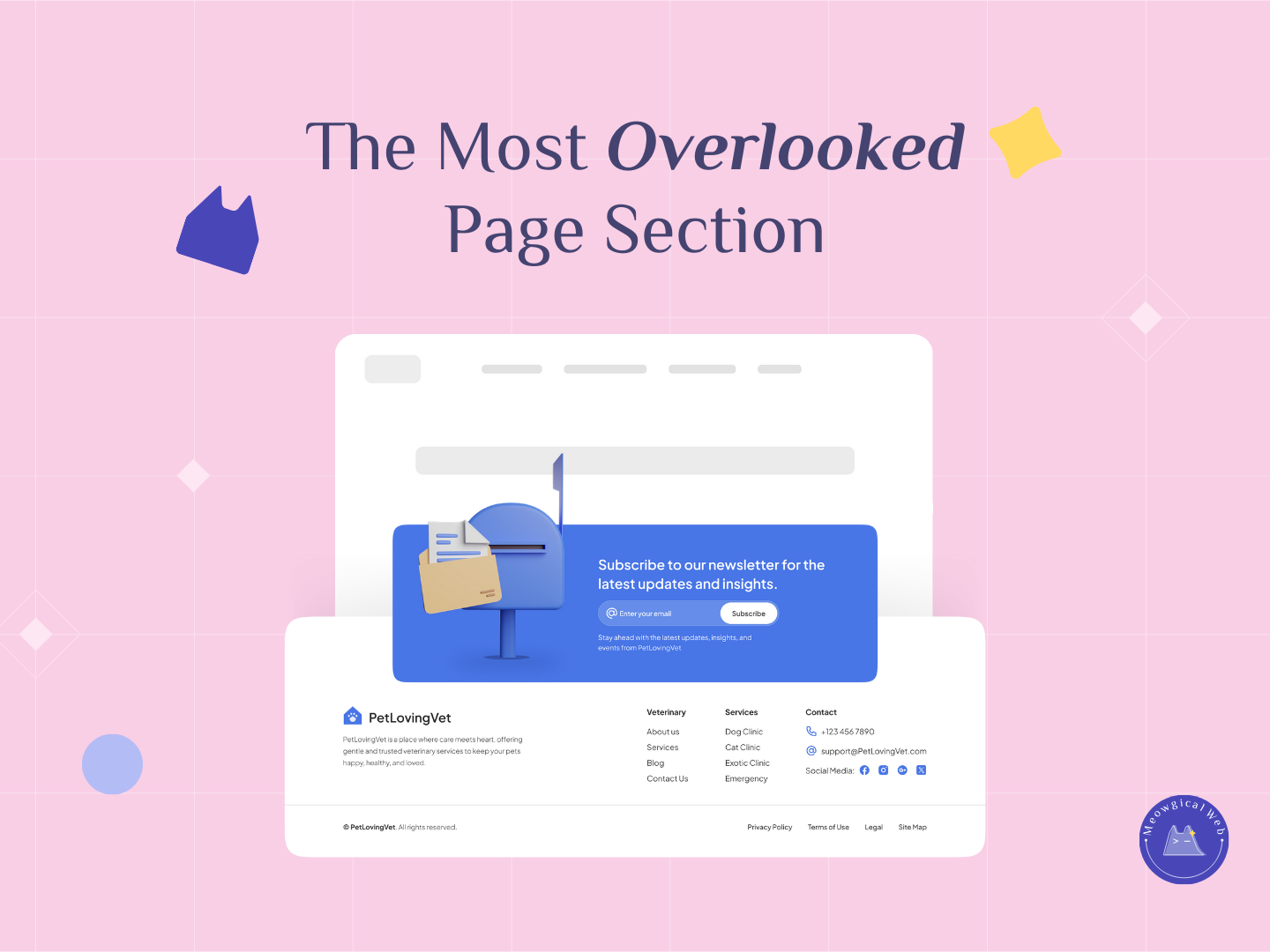
Quick links to important pages make navigation effortless. Include services, contact page, booking page, about page, and reviews. These should be clearly labeled and organized logically. Moreover, grouping related links together (all services in one column, for example) helps visitors find what they need faster.
Complete contact information belongs prominently in your footer. Phone number (clickable on mobile), email address, and physical address with a link to Google Maps. Additionally, make sure your phone number is large enough to read easily and stands out visually from other text.
Social media links actually linking to your real profiles matter more than you’d think. Many people prefer reaching out via Facebook Messenger or Instagram DMs rather than calling. Furthermore, visible social links build credibility by showing you’re active on multiple platforms.
Trust signals reassure anxious pet parents right when they’re deciding whether to contact you. “Licensed & Insured,” “Member of [Pet Industry Association],” “Certified Pet Care Provider,” or “Family Owned Since 2015” all build confidence. Moreover, these small credibility markers can tip the decision in your favor.
Business hours should be visible without clicking through to another page. “Open Monday-Saturday 8am-6pm, Closed Sundays” right in the footer saves visitors a click and answers a common question immediately. Additionally, if you offer emergency services, note those hours too.
The Newsletter Signup Question
Many pet businesses include newsletter signup forms in their footer. This can work well if done right, but it’s often done wrong.
A good footer newsletter signup is brief and benefit-focused. “Get monthly pet care tips” or “Be first to know about special offers” explains what people get. Additionally, keep the form simple – just email address, no extensive fields.
However, don’t let the newsletter signup dominate your footer. Contact information and navigation links matter more for conversion. Therefore, newsletter signups work best as a supplementary element, not the main focus.
Test whether newsletter signups in your footer actually convert. If you’re getting very few signups, that space might be better used for more prominent contact info or trust signals. Moreover, some pet businesses find newsletter signups work better on service pages where people are more engaged.
Footer Organization That Works
Structure your footer in clear columns or sections. One column for navigation links, one for contact info, one for social media and trust signals. This organization helps eyes scan quickly to find what they need. Furthermore, clear visual separation between sections reduces cognitive load.
Mobile footer design matters enormously since most visitors view your site on phones. Your footer should stack cleanly on mobile with everything still readable and tappable. Additionally, test how your footer actually looks and functions on a phone screen regularly.
Keep your footer background simple and readable. High contrast between text and background ensures everything is legible even at a glance. Moreover, avoid busy patterns or dark backgrounds that make text hard to read.
Make clickable elements obviously clickable. Phone numbers should look like buttons or links, not just plain text. Email addresses should be mailto: links that open email clients. Additionally, social media icons should be large enough to tap easily on mobile.
What to Skip in Your Footer
Don’t create footer navigation that duplicates your header navigation exactly. This wastes space without adding value. Instead, focus on the links people most commonly need – contact, services, booking. Therefore, your footer becomes a curated selection of important links, not a complete sitemap.
Skip lengthy legal text in your footer body. Links to Privacy Policy and Terms are fine, but don’t paste entire legal disclaimers. Additionally, these just create clutter that makes important information harder to find.
Avoid too many competing calls-to-action. If everything is highlighted and important, nothing stands out. Pick one primary action (usually “Book Now” or your phone number) to emphasize visually. Moreover, let other elements support rather than compete with that main action.
Don’t forget to update your footer regularly. Outdated hours, old phone numbers, or broken social media links damage trust. Furthermore, keeping footer information current is basic maintenance that many pet businesses neglect.
The Local SEO Benefit
Here’s a bonus reason to optimize your footer: Google reads it. Consistent contact information across your site, including in the footer, helps local SEO. When Google sees your Name, Address, and Phone number (NAP) displayed consistently, it reinforces your local presence.
Additionally, footer links to your Google Business Profile, social media, and service pages contribute to your site’s overall SEO structure. Search engines use these signals to understand your business better. Therefore, a well-structured footer isn’t just good for users – it helps search engines too.
Check Your Footer Right Now
Open your website on your phone right now and scroll to the footer. Seriously, do it. What do you see? Is your phone number clearly visible and clickable? Can you easily find your address, hours, and social media? Moreover, are there quick links to book or contact you?
If your footer is basically empty, you’re leaving opportunities on the table. Additionally, you’re frustrating the visitors who are actively looking for ways to contact you.
Ask someone unfamiliar with your business to find your phone number and hours using only your website. If they have to hunt or click multiple times, your footer needs improvement. Therefore, use this simple test to identify what’s missing.
Your footer is one of the last things visitors see before leaving your site. Make it count. Give them everything they need to feel confident booking with you. Moreover, make contacting you as frictionless as possible right when they’re deciding whether to reach out.
Go look at your footer right now. Is it helpful or empty? Time to make it work harder for your business!